So I’m not fully sure why, but I’ve always been big into music. It’s a big part of who I am and I love sharing it with the world! I really loved Discord’s Spotify integration feature that lets users share not just what they’re listening to, but also where in the track they are.
I have memories of seeing what my classmates were listening to and just getting a vibe for who people were that way. It was nifty to be in a server with a couple dozen strangers, and their miniplayers next to their name.
So when it came time to build out my own personal website, I thought it would be a nice touch if the strangers who visited found me, a stranger, with a miniplayer next to my name. Plus, if Discord integrated with Spotify then they must support it, right?
…right?
Table of Contents
Open Table of Contents
So I looked into the Spotify API and…
They don’t! At least not for you and me. It turns out they don’t support websockets?? or anything real-time it seems. Spotify has a partnership with discord to support this feature, but they do not expose it to regular developer accounts.
I figured, however, it wouldn’t be that challenging to just create a service that internally polled the current song endpoint and then pushed any relevant updates to connected clients over some sort of real-time protocol. I’ve been wanting to mess with server sent events for a while now and took this as an opportunity to finally do something with them.
SSE? I haven’t heard of that before what is it?
Websockets have a robust lifecycle that requires additional overhead and architecture to support its bidirectional communication functionalities. Server-sent Events, however, are UNIdirectional (as the name implies, its server -> client only). Setting up a SSE connection is as simple as a client making a GET request, and then responding with a content-type of text/event-stream. Then, the server simply periodically sends plain text data in the format of
event:eventname
data:{"hello":"world"}
\n
\n
and that’s it! SSE functionality is built into native browser functionality with the EventSource API.
const es = new EventSource("https://myserver.com/path");
es.addEventListener("eventname", data => {
  console.log(data); // <- data is { hello: "world" }!
});client.js
It’s so simple I implemented the server logic for it in just under 40 lines, and I’m by no means a golang wizard so I’m sure there’s an even easier implementation out there.
I also kinda wanted a chance to play with golang channels / goroutines for no other reason than I think they’re a really cool language feature and I haven’t really had a solid use case for them yet, so I decided to build this project around them.
How it sort of works
I used this excellent Spotify API library for the actual interfacing with Spotify. What’s nice about this is it gives us an existing data struct representing the Spotify current listening data libspot.CurrentPlaying.
I first created a simple Listener structure which wrapped a chan *libspot.CurrentPlaying for us to send updates through. When a user connects to our /sse endpoint, I create a new listener struct for their session and register it to a global Notifier singleton.
type Notifier struct {
	listeners []Listener
}

func  (n *Notifier) NewListener() *Listener {
    // -- snip --
}

func (n *Notifier) Cleanup() {
    // -- snip --
}

type Listener struct {
	owner *Notifier
	Ch    chan *libspot.CurrentlyPlaying
}internal/playback/notifier.go
I then created a primary background goroutine for the Notifier to poll Spotify. The initial implementation of this would just always forward that data to any connected client.
func (n *Notifier) notifyAll(data *libspot.CurrentlyPlaying) {
    for _, l := range n.listeners {
        go func() {
            l.Ch <- data
        }
    }
}

func (n *Notifier) Run() {
    client := WaitForClient()

    for {
        data, err := client.PlayerCurrentlyPlaying(context.Background())
        if err != nil {
            log.Printf("Failed to poll playback: %v", err)
            time.Sleep(5 * time.Second)
            return
        }

        n.notifyAll(data)
    }
}internal/playback/notifier.go
Now there is a case where because we are just always firing into l.Ch and aren’t buffering anything, things could get a bit blocked. However, I’m comfortable with this tradeoff because of the scale of this project and number of active sessions I’m expecting to have.
I also went through and added an auth flow to initialize the shared Spotify API client object, but that’s not super interesting so I’ll omit much of it from this. I had a basic working implementation
func main() {
    n := playback.NewNotifier()
    mux := http.NewServeMux()

    go n.Run() // this runs our loop in the background
    playback.BeginAuthFlow() // again, don't worry about this

    mux.HandleFunc("/sse", func (w http.ResponseWriter r *http.Request) {
        l := n.NewListener()
        defer l.Cleanup()

        sse := sse.NewSSEWriter(w)
        sse.WriteHeaders()

        initial, err := playback.WaitForClient().PlayerCurrentlyPlaying(context.Background())
        if err != nil {
            http.Error(w, "failed to fetch spotify data")
            return
        }

        sse.WriteEvent("initial", initial)

    loop:
        for {
            select {
            case <- w.(http.CloseNotifier).CloseNotify():
                break loop
            case data, ok := l.Ch:
                if !ok {
                    break loop
                }

                sse.WriteEvent("update", data)
                time.Sleep(2 * time.Second)
            }
        }
    })

    if err := http.ListenAndServe(":3000", mux); err != nil {
        log.Fatal(err)
    }
}main.go
So what’s going on here? When I first watched the keynote Golang team gave about select in the context of channels I was kinda blown away. Here, we wait in a loop for one of two possible events. The first event that could happen is we could receive a value from the CloseNotify() channel which will send exactly one message over the channel if the writer is closed (i.e. the user disconnects). We handle this case by breaking out of the loop and letting the deferred cleanup code run. We are also listening for data coming over the l.Ch channel and handling it by forwarding it to the sse writer.
update: in between developing this and writing this post,
CloseNotifywas deprecated in favor of<-r.Context().Done()so use that if you’re copying me I guess. Just don’t flame me is what I’m trying to say. I’m just a little guy after all.
Now this works, but it isn’t super performant and to be honest, it’s kinda cringe. The vast majority of times, I will either not be listening to a song, or I’ll be listening to a song and the only thing that changed was my position in the song’s duration, however that change can be predicted by the client. In reality, the server really only needs to send updates if current song changed to or from nil, play/pause state changed, the song itself changed, or the difference in position of the current song changed more than the time between the last poll event.
To incorporate these changes, I first needed to keep track of the previous state for us to compare the new current listening data against, since we only want to emit data if we absolutely have to. We also should keep track of the time when the last poll was run.
type Notifier struct {
    prev_data   *libspot.CurrentPlaying
    prev_time   time.Time
	listeners   []Listener
}internal/playback/notifier.go
Then, I updated the notifier logic accordingly
func (n *Notifier) Run() {
    client := WaitForClient()

    for {
        func() {
            data, err := client.PlayerCurrentlyPlaying(context.Background())
            if err != nil {
                log.Printf("Failed to poll playback: %v", err)
                time.Sleep(5 * time.Second)
                return
            }

            if n.prev_data == nil {
				n.prev_data = data
				n.prev_time = time.Now()
				return
			}

			cur_time := time.Now()
			progress_delta_sec := (data.Progress / 1000) - (n.prev_data.Progress / 1000)
			time_delta_sec := cur_time.Unix() - n.prev_time.Unix()

            // under normal playback, the song’s progress should advance roughly one second per second
            // any meaningful deviation from that implies a pause, seek, or track change
			jitter := math.Abs(float64(progress_delta_sec - libspot.Numeric(time_delta_sec)))

			defer func() {
				n.prev_data = data
				n.prev_time = cur_time

				time.Sleep(2 * time.Second)
			}()

            if jitter > 1 {
                n.notifyAll(data)
                return
            }

			if n.prev_data.Item == nil || data.Item == nil {
                n.notifyAll(data)
				return
			}

            if n.prev_data.Item.Name != data.Item.Name {
                n.notifyAll(data)
                return
            }

            if n.prev_data.Playing != data.Playing {
                n.notifyAll(data)
            }

            n.notifyAll(data)
        }()
    }
}internal/playback/notifier.go
Okay cool! This approach worked fairly well. So next up was creating a client to connect to this service for my site. Astro lets us use whichever web framework we want for dynamic client stuff like this, but since I’m fairly react-pilled from work I decided to just roll with that.
Go go gadget web developer
I first, like any good React developer, created a zod schema to validate the shape of the incoming Spotify API data. Because I was lazy in the server, this data is 1:1 with the shape that the Spotify API gives us. I probably shouldn’t do it this way, but there’s no one around to stop me. Now, this isn’t how I want to represent our data in state, especially because SSE updates aren’t the only thing that will be causing state updates. So we also construct a Song state shape.
import { z } from "zod";

type Song = {
  href: string;
  title: string;
  artists: {
    name: string;
    href: string;
  }[];
  image?: string;
  time: {
    cursor: number;
    duration: number;
  };
};

const zUpdateSchema = z.object({
  is_playing: z.boolean(),
  progress_ms: z.number(),
  item: z.object({
    duration_ms: z.number(),
    name: z.string(),
    href: z.string(),
    external_urls: z.object({ spotify: z.string() }),
    album: z.object({
      images: z
        .object({
          height: z.number(),
          width: z.number(),
          url: z.string(),
        })
        .array(),
    }),
    artists: z
      .object({
        name: z.string(),
        href: z.string(),
      })
      .array(),
  }),
});src/components/Player.tsx
The rest of this is fairly trivial. We create two useEffects— one to handle the SSE events, and one to handle moving the progress bar if the song is playing.
import { z } from "astro/zod";
import { useEffect, useState } from "react";
import { clsx } from "clsx";
import IconPauseUrl from "@/assets/icons/IconPause.svg?url";

export const Player = () => {
  const [song, setSong] = useState<Song | null>(null);
  const [isPlaying, setIsPlaying] = useState(false);

  useEffect(() => {
    const interval = setInterval(() => {
      if (!song || !isPlaying) return;
      setSong({
        ...song,
        time: { duration: song.time.duration, cursor: song.time.cursor + 500 },
      });
    }, 500);

    return () => {
      clearInterval(interval);
    };
  }, [song, isPlaying]);

  useEffect(() => {
    const source = new EventSource("https://spotipub.holewinski.dev/sse");

    function ondata(evt: MessageEvent) {
      const payload = zUpdateSchema.safeParse(JSON.parse(evt.data));

      if (!payload.success) {
        setSong(null);
        return;
      }

      setIsPlaying(payload.data.is_playing);

      setSong({
        title: payload.data.item.name,
        artists: payload.data.item.artists,
        href: payload.data.item.external_urls.spotify,
        image: payload.data.item.album.images
          .toSorted((a, b) => b.height - a.height)
          .at(0)?.url,
        time: {
          cursor: payload.data.progress_ms,
          duration: payload.data.item.duration_ms,
        },
      });
    }

    source.addEventListener("initial", ondata);
    source.addEventListener("update", ondata);

    return () => {
      source.removeEventListener("initial", ondata);
      source.removeEventListener("update", ondata);
    };
  }, []);

  if (!song) return null;

  return (
    <div className="mt-6 w-full rounded-md border-1 border-foreground bg-background p-2 sm:w-[300px]">
      <div className="flex gap-2">
        <div className="relative aspect-square h-14 w-14">
          {!isPlaying && (
            <object
              className="absolute top-1/2 right-1/2 z-10 translate-x-1/2 -translate-y-1/2"
              data={IconPauseUrl}
            />
          )}
          <img
            className={clsx(
              "absolute top-0 left-0 aspect-square h-14 w-14 rounded-sm",
              !isPlaying && "opacity-15"
            )}
            src={song.image}
          />
        </div>

        <div className="flex flex-col truncate">
          <span className="text-xs opacity-80">Listening to</span>

          <a
            href={song.href}
            className="text-sm decoration-dashed hover:underline"
          >
            {song.title}
          </a>

          <div className="flex gap-2 [&>*:not(:last-child):after]:content-[',']">
            {song.artists.map(a => (
              <a
                href={a.href}
                className="text-xs decoration-dashed hover:underline"
              >
                {a.name}
              </a>
            ))}
          </div>
        </div>
      </div>

      <div className="mt-2 h-1 w-full rounded-full border-1 border-foreground">
        <div
          className="h-0.5 rounded-full bg-foreground transition-all duration-300 ease-linear"
          style={{
            width: `${(song.time.cursor / song.time.duration) * 100}%`,
          }}
        ></div>
      </div>
    </div>
  );
};src/components/Player.tsx
We use tailwind of course to fully embrace the techbro hypebeast stack. Although sometimes when I hit tailwind with stuff like [&>*:not(:last-child):after]:content-[','], which translates to
& > *:not(:last-child):after {
  content: ",";
}
I do die a little inside and wonder how we as an industry got here with this syntax. Then I remember how we got here, and I feel even bleaker. Although I blame CSS more than tailwind for this, I figured I would at least call it out as equal parts nifty and goofy.
…well, perhaps not equal parts.
We can just drop this component into our astro file with a client:load directive since this widget appearing will cause a bit of layout shift. This isn’t ideal and I’m still working on finding a way to better handle this case, but for now it’s decent enough.
<div class="flex w-full justify-end">
  <Player client:load />
</div>src/pages/index.astro
And voila! I have a cute little Discord-style Spotify presence widget on my homepage.
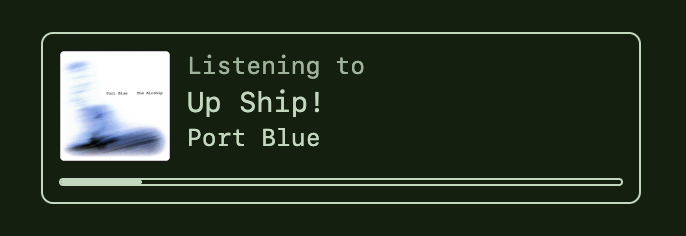
Now, when strangers come say hi and visit my site, they’ll get that same tiny window into me that I always loved having into those around me.