Okay so I really like Blockly. I’m going to be quite critical of it, but I think it’s a fantastic project. I myself in my earliest programming years remember tinkering with MIT’s Scratch, so block-based programming will always hold a space in my heart.
When I discovered the Blockly library, I was so excited and had so many ideas of what to use it for. I had an 8 hour amtrak trip one weekend so I decided to dedicate my trip to getting a simple example working with Blockly, however I quickly realized the DX was an absolute nightmare. I knew I wanted to use Blockly for my capstone project, but really didn’t want to deal with making that many blocks for my project.
Okay, so let me demonstrate the problem
Let’s say that we want to create just a handful of blocks.
- A simple “math” operator (+, -, *, /)
- An “if” statement, which takes a boolean and conditionally runs a block of code
- An “if/else”, which is identical to the “if” statement but lets you run a block of code if the condition is false
- A “literal” block for each type (string, number, boolean)
- A numeric compare operator (<, >, <=, >=, ==, !=)
- A block that creates text output (like
alert(),console.log, etc)
So Blockly has this interactive playground that they promote to let users generate code for these block definitions. Let’s take a look at it and create our first block, the “math operator”.
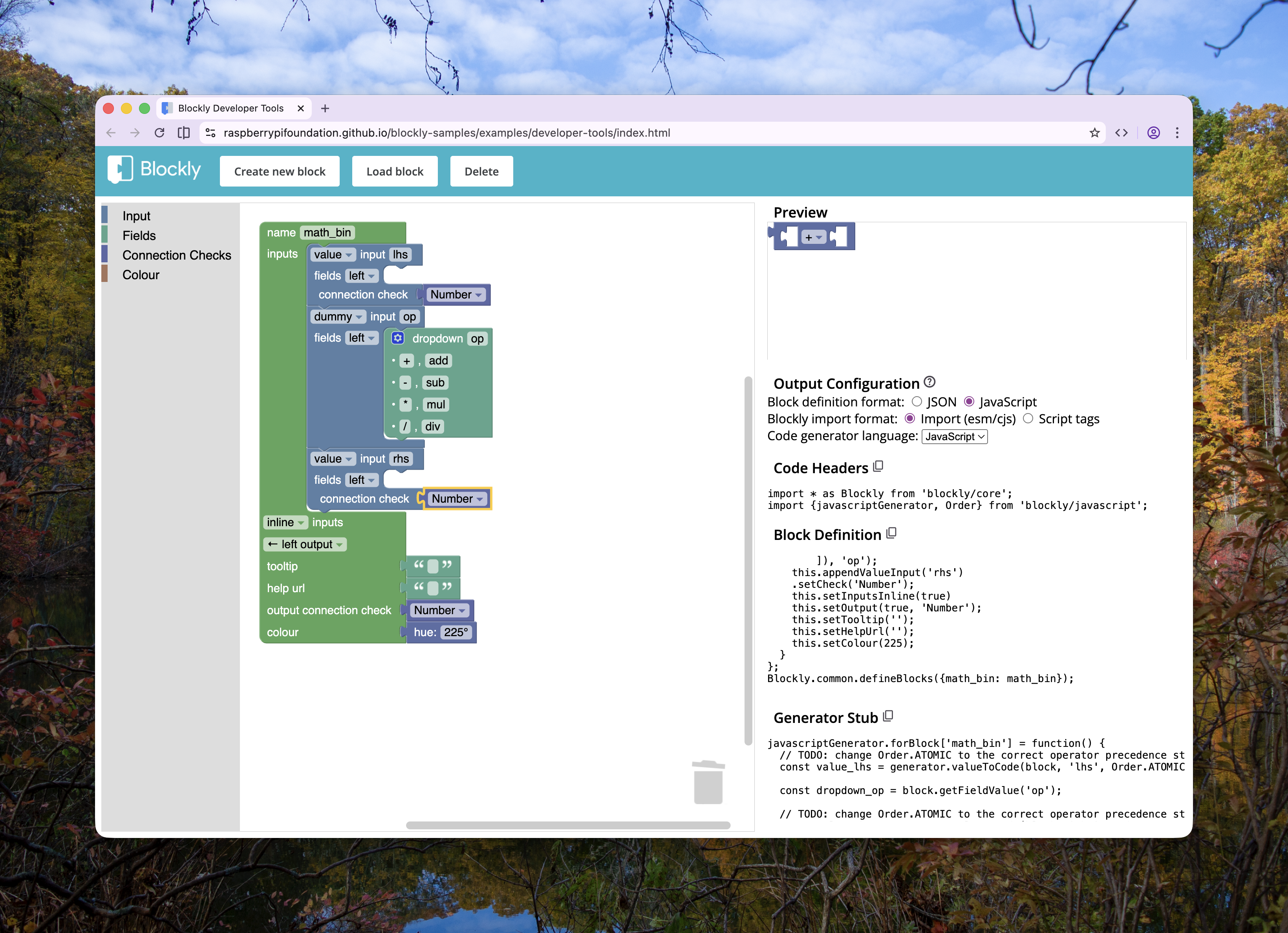
This produces two notable pieces of codegen: the first is the block definition, and the second is generator code. What’s notable is these two pieces of code are interdependent, but not colocated. This mean that a change to the block definition requires a change to the generator, but may not be immediately obvious to an incoming new developer on a project (or perhaps a developer like me who may have forgotten). This, along with just the general verbosity required to make a block, is what I wanted to set out to fix. Additionally, I find that needing to use a GUI like this is perhaps indicative of a larger DX issue— especially when (and perhaps this is a skill issue) the GUI itself I find kinda cumbersome.
const math_bin = {
  init: function () {
    this.appendValueInput("lhs").setCheck("Number");
    this.appendDummyInput("op").appendField(
      new Blockly.FieldDropdown([
        ["+", "add"],
        ["-", "sub"],
        ["*", "mul"],
        ["/", "div"],
      ]),
      "op"
    );
    this.appendValueInput("rhs").setCheck("Number");
    this.setInputsInline(true);
    this.setOutput(true, "Number");
    this.setTooltip("");
    this.setHelpUrl("");
    this.setColour(225);
  },
};
Blockly.common.defineBlocks({ math_bin: math_bin });generated-block-definition.jsjavascriptGenerator.forBlock['math_bin'] = function() {
const value_lhs = generator.valueToCode(block, 'lhs', Order.ATOMIC);
const dropdown_op = block.getFieldValue('op');
const value_rhs = generator.valueToCode(block, 'rhs', Order.ATOMIC);
// TODO: Assemble javascript into the code variable.
const code = '...';
// TODO: Change Order.NONE to the correct operator precedence strength
return [code, Order.NONE];generated-generator-definition.jsFrom here, of course, we would need to go through and update our generator code accordingly:
javascriptGenerator.forBlock["math_bin"] = function (block) {
  const value_lhs = generator.valueToCode(block, "lhs", Order.ATOMIC);

  const dropdown_op = block.getFieldValue("op");
  const op = {
    add: "+",
    sub: "-",
    mul: "*",
    div: "/",
  }[dropdown_op];

  const value_rhs = generator.valueToCode(block, "rhs", Order.ATOMIC);

  // TODO: Assemble javascript into the code variable.
  const code = "...";
  // TODO: Change Order.NONE to the correct operator precedence strength
  return [code, Order.NONE];

  return `${value_lhs}${op}${value_rhs}`;
};generated-generator-definition.js
Here, we can see our next problem. This is all javascript, which means we don’t really know what the values of dropdown_op are. Now, looking at the definition we can see that it can only be one of four possible values, but because that definition is entirely separate from the generator code, we have no way of easily seeing that.
So anyway, let’s make it typesafe and ergonomic
What I really wanted to do was to create a utility that would let be express the blocks definition and implementation (generator) in one expression. This not only solves the colocating issues, but also means that we can easily get proper type inference into our fields. I’ll skip to what I came up with as a sort of “hook” to keep you reading lol.
import * as Blockly from "blockly/core";
import { createBlockBuilder } from "better-blockly";

const generator = new Blockly.Generator("demo");

const block = createBlockBuilder({
  Blockly,
  generator,
  customTypes: ["boolean"],
});

block("math_bin")
  .inline()
  .outputs("Number") // <- we get typesaftey here!
  .slot("lhs", { allow: "Number", content: v => v })
  .slot("rhs", {
    allow: "Number",
    content: v => v.dropdown("op", ["<", ">", "<=", ">="]),
  });example.ts
That’s pretty cool huh— this will take the passed Blockly instance and define a block named "math_bin" with all the same specifications as before. You may have noticed though that this is only the definition, not the implementation. This is where things get really nifty—
import * as Blockly from "blockly/core";
import { createBlockBuilder } from "better-blockly";

const generator = new Blockly.Generator("demo");

const block = createBlockBuilder({
  Blockly,
  generator,
  customTypes: ["boolean"],
});

block("math_bin")
  .inline()
  .outputs("Number") // <- we get typesaftey here!
  .slot("lhs", { allow: "Number", content: v => v })
  .slot("rhs", {
    allow: "Number",
    content: v =>
      v.dropdown("op", {
        add: "+",
        sub: "-",
        mul: "*",
        div: "/",
      }),
  })
  .impl(({ fields, resolve }) => {
    return `${resolve("lhs")}${fields.op}${resolve("rhs")}`;
  });example.ts
We are able to known prior to runtime if a key in the implementation is misaligned with the definition because each time we define a slot or field in the definition, we encode both that key, as well as its values, and use them to help type the impl block!
.impl(({ fields, resolve }) => {
  fields. // autocomplete shows: op
  resolve( // autocomplete shows: "lhs" | "rhs"
})